
Control Viral Instagram
Hand Portal Filter Video
Create fun interactive videos using your hands. Open a portal with your hand gesture, apply filter effects, and record your result directly in your browser.
Free • Online • No Installation • Private & Secure
Explore related tools
Different jobs, same file here's what people use alongside this tool.
What Is Hand Portal Filter?
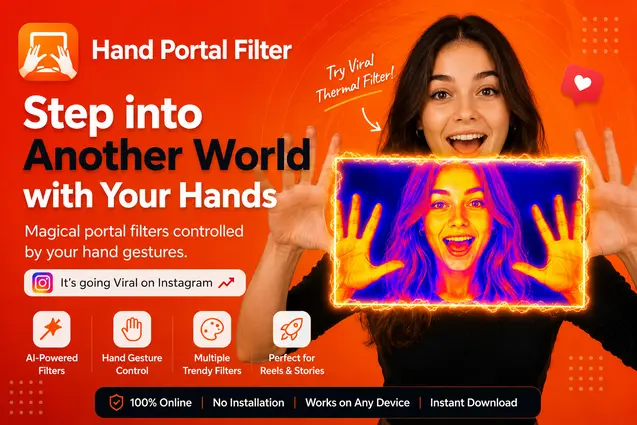
Hand Portal Filter is an interactive camera filter that uses your hand gestures to apply a filter portal on your live camera feed. Experiment with different effects and create unique videos for social media.
Create Something Different
Turn your camera into an interactive playground.
Hand Gesture Control
Control the portal naturally with your hands.
Creative Visual Filters
Apply unique effects inside the portal.
Thermal Filter
Transform the portal into a colorful infrared-inspired visual effect.
Record & Download
Record your creation and download the finished video.
How It Works
- 01Allow Camera AccessGive your browser permission to access your camera.
- 02Show Your HandsPlace both hands in front of the camera.
- 03Create the PortalUse your hand position to create the interactive portal.
- 04Apply an EffectExperiment with the available visual filters.
- 05Record & DownloadRecord your video and download it when you're finished.
Perfect For
Why Use Hand Portal Filter?
Free to Try
Create videos without installing a separate application.
Works Online
Use the filter directly from your browser.
Hand Controlled
Interact with the effect naturally using your hands.
Portrait & Landscape
Create videos in the format that fits your content.
Instant Recording
Record your camera experience and download the result.
Private & Secure
Your camera experience runs directly in your browser.
Create Videos for Social Media
Make your camera videos more interactive and eye-catching. Create unique hand-controlled effects for Instagram Reels, YouTube Shorts, and other short-form content.
Why a simple hand gesture reads as 'magic' on camera
The portal effect works because it plays on something viewers already expect from sci-fi and VFX-heavy content, but does it live, with your own hands, without a green screen or a compositing pass. That gap between looking complicated and just being a webcam is exactly why clips like this tend to get replayed rather than scrolled past.
Hand-tracked effects live or die on responsiveness. If the portal lags behind your gesture by even a few frames, the whole illusion falls apart, your brain immediately reads it as a filter instead of a real interaction. Getting that timing right in the browser, without asking someone to install anything, is the harder engineering problem hiding behind what looks like a simple party trick.
Most people get the best results by treating the first few tries as rehearsal, not the final take. Camera distance, lighting, and how deliberately you move your hands all change how clean the portal edge looks. A slower, more exaggerated gesture almost always reads better on camera than a fast, subtle one.
“Slower hand movements film so much better than I expected, quick gestures just look blurry.”
Talia Bloom - Content creator
“Recorded a dozen takes in a row with zero installs. That alone makes this worth using for quick social clips.”
Rico Fernsby - Video producer
“Good lighting matters more than a good camera here, a cheap ring light fixed most of my early takes.”
Nadia Okoro - Streamer
Frequently Asked Questions
What is Hand Portal Filter?
Hand Portal Filter is an interactive online camera effect that uses your hand positions to create a visual portal on your live camera feed.
Is Hand Portal Filter free?
Yes. You can try the Hand Portal Filter online for free.
Does Hand Portal Filter work on mobile?
Yes, it works on supported modern mobile browsers with camera access.
Do I need to install an app?
No. The Hand Portal Filter works directly in your browser.
Does Hand Portal Filter need camera access?
Yes. Camera permission is required so the tool can detect your hands and apply the effect.
Can I record my Hand Portal video?
Yes. You can record your filtered camera video and download it when finished.
What is the Thermal filter?
Thermal is a creative infrared-inspired visual effect that gives the portal a colorful heat-map appearance.
Can I use Hand Portal Filter for Instagram Reels?
Yes. Use portrait mode to create vertical videos suitable for Reels, Shorts, and other short-form content.
Is my camera video uploaded?
The camera processing happens directly in your browser, so the live camera experience does not require uploading your camera feed to a server.
Ready to Create Your Hand Portal?
Turn your hands into a portal and create something different.
Try Hand Portal Filter - Free Online